Using the API to Find Free Hosted Models on NVIDIA Builder
- Steve Scargall
- Ai
- April 6, 2026
The NVIDIA Developer Program provides access to a wide catalog of AI models through NVIDIA Inference Microservices (NIM), offering an OpenAI-compatible API. You can browse and discover available models at build.nvidia.com/explore/discover .
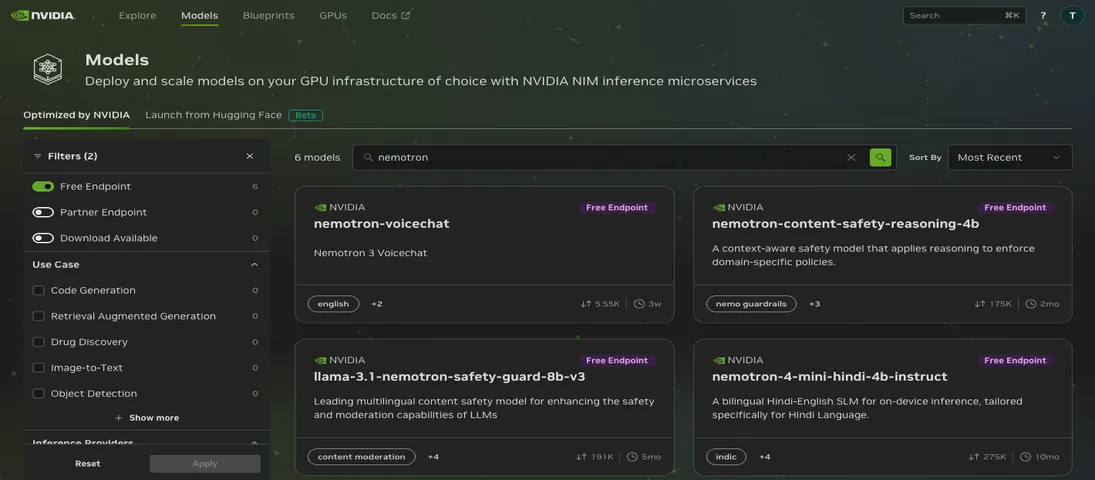
If you want to find models with free hosted endpoints in the browser, you can enable the “Free Endpoint” filter
on the model catalog page. But what if you need that information programmatically – in a script, a CI pipeline, or as part of an automated workflow? The browser filter is not accessible through the API, and the /v1/models endpoint does not distinguish between free hosted models and everything else.
I wrote a Bash script that takes the API approach: probe every model in the catalog and find out which ones actually respond to chat completion requests.
The Problem
The NIM /v1/models endpoint returns every model in the catalog. When I ran the script on April 6, 2026, that was 189 models. But not all of those are LLM-style chat models, and not all of them are currently live. The catalog includes embedding models, vision models, reward models, and models that have been retired or are temporarily unavailable. There is no field in the API response that tells you “this model is currently hosted and accepts /v1/chat/completions requests.”
The browser’s “Free Endpoint” filter solves this for interactive use, but if you want a machine-readable list – or need to verify endpoint availability as part of an automated workflow – you need a different approach.
What the Script Does
The script, list-nvidia-hosted-models.sh, automates a three-step process:
- Fetches the full model catalog from the NIM API (
/v1/models) - Probes each model by sending a minimal chat completion request
- Classifies and reports each model based on the HTTP response
Each model gets a short test payload:
{
  "model": "meta/llama-3.1-8b-instruct",
  "messages": [
    {"role": "system", "content": "You are a helpful assistant."},
    {"role": "user", "content": "Respond only with OK."}
  ],
  "max_tokens": 8
}
The max_tokens: 8 keeps costs and latency minimal. We don’t care about the response content, only whether the endpoint accepts the request.
How It Works
Let’s walk through the key parts of the script.
Setup and API Key
#!/usr/bin/env bash
set -euo pipefail
: "${NVIDIA_API_KEY?Must export NVIDIA_API_KEY}"
The script requires an NVIDIA_API_KEY environment variable. If it is not set, the script exits immediately with a clear error. See the Running It Yourself
section below for how to get an API key.
Fetching the Model Catalog
BASE_URL="https://integrate.api.nvidia.com/v1"
curl -s --max-time "$TIMEOUT" "$BASE_URL/models" \
  -H "Authorization: Bearer $NVIDIA_API_KEY" \
  -H "Content-Type: application/json" \
  > "$MODELS_FILE"
The full model list is saved to a temporary file, and model IDs are extracted with jq:
jq -r '.data[].id // empty' "$MODELS_FILE"
Probing Each Model
For each model ID, the script sends a chat completion request and captures both the HTTP status code and response body:
raw_response=$(
  curl -s --max-time "$TIMEOUT" \
    -w 'STATUS:%{http_code}' \
    "$BASE_URL/chat/completions" \
    -H "Authorization: Bearer $NVIDIA_API_KEY" \
    -H "Content-Type: application/json" \
    -d "$payload" 2>/dev/null || echo "STATUS:000"
)

status_code="${raw_response##*STATUS:}"
response_body="${raw_response%STATUS:*}"
The -w 'STATUS:%{http_code}' flag appends the HTTP status code to the response body. The script then splits on the STATUS: marker using Bash parameter expansion to extract both parts. If curl fails entirely (network error, DNS failure), the || echo "STATUS:000" fallback ensures we still get a parseable result.
Classifying Results
The script categorizes each model into one of four buckets:
| Status | Meaning |
|---|---|
HTTP 200 with valid JSON containing choices or model | Model is hosted and responding to chat completions |
| HTTP 429 | Rate-limited, but this confirms the model endpoint exists and is hosted |
| HTTP 404/403/401/500 | Model is not available (removed, not a chat model, or broken) |
| Everything else (400, 422, 000, timeouts) | Ambiguous – could be a non-chat model, temporarily down, or requires a different request format |
case "$status_code" in
  200)
    if jq -e 'has("choices") or has("model")' <<<"$response_body" >/dev/null 2>&1; then
      echo "model_name"        # Hosted and working
    fi
    ;;
  429)
    echo "model_name"          # Rate-limited but hosted
    ;;
  404|403|401|500)
    # Not available
    ;;
esac
Output Files
The script produces two timestamped output files:
nvidia_hosted_models_<timestamp>.txt– Just the model IDs that are confirmed hosted, one per line. Useful as input to other scripts or for programmatic consumption.nvidia_test_results_<timestamp>.txt– The full test log with every model and its status. Useful for auditing and debugging.
What I Found
Running the script on April 6, 2026, against the 189 models in the catalog:
- 101 models returned successful chat completions or were rate-limited (confirmed hosted)
- 62 models returned HTTP 404 (removed or never hosted as chat endpoints)
- 6 models returned HTTP 500 (server errors, likely temporarily broken)
- 20 models returned ambiguous results (400, 422, timeouts, or no response)
Some interesting observations:
Retired models still in the catalog. Models like meta/llama2-70b, databricks/dbrx-instruct, and adept/fuyu-8b return 404. They appear in the catalog but are no longer hosted.
Embedding models fail gracefully. Models like nvidia/nv-embed-v1 and baai/bge-m3 return 404 because they only serve embedding endpoints (/v1/embeddings), not chat completions.
Large models tend to time out. Several large models like nvidia/llama-3.1-nemotron-ultra-253b-v1 (253B parameters) and qwen/qwen3.5-397b-a17b returned HTTP 000, meaning the request timed out within the 5-second window. These models may need longer to cold-start or may have limited capacity.
Duplicate entries exist. nvidia/nemotron-3-super-120b-a12b and openai/gpt-oss-120b each appeared twice in the results, suggesting duplicate entries in the catalog.
The catalog is diverse. Working models span providers including Meta, Google, Microsoft, Mistral, Qwen, DeepSeek, NVIDIA, and many others. The platform is not just for NVIDIA models.
Why This Is Useful
Programmatic access. The browser’s “Free Endpoint” filter is great for interactive browsing, but scripts and automation need a machine-readable list. This script produces clean text files you can pipe into other tools.
Model selection. If you are building an application on the NVIDIA Developer Program, you need to know which models are actually available before you write code against them.
Monitoring. Run this script periodically to track which models come and go. You can diff the output files to detect changes over time.
Cost optimization. By knowing which smaller models have free hosted endpoints, you can test whether a 7B or 8B parameter model is sufficient for your use case before paying for a larger model.
CI/CD validation. If your pipeline depends on a specific NIM model, you can add this script (or a simplified version targeting a single model) as a health check.
Running It Yourself
Getting an API Key
You will need a free NVIDIA API key from the NVIDIA Developer Program :
- Sign in (or create an account) at build.nvidia.com
- Click your avatar icon in the top-right corner
- Select “API Keys” from the menu
- Click “Generate API Key”
Your key will start with nvapi-. For more details, see the NVIDIA API Quickstart Guide
.
Running the Script
Export your API key and run the script:
export NVIDIA_API_KEY="nvapi-xxxxxxxxxxxxxxxxxxxxxxxxxxxx"
./list-nvidia-hosted-models.sh
The script takes a few minutes to complete since it tests each model sequentially with a 0.1-second delay and a 5-second timeout per request.
The Full Script
#!/usr/bin/env bash

set -euo pipefail

: "${NVIDIA_API_KEY?Must export NVIDIA_API_KEY}"

BASE_URL="https://integrate.api.nvidia.com/v1"
MODELS_FILE=$(mktemp /tmp/nvidia_models.XXXXXX.json)
trap 'rm -f "$MODELS_FILE"' EXIT
INTERVAL=0.1
TIMEOUT=5

TIMESTAMP=$(date +%Y%m%d_%H%M%S)
SUCCESS_FILE="nvidia_hosted_models_${TIMESTAMP}.txt"
RESULTS_FILE="nvidia_test_results_${TIMESTAMP}.txt"

>&2 echo "Fetching models from $BASE_URL/models ..."

curl -s --max-time "$TIMEOUT" "$BASE_URL/models" \
  -H "Authorization: Bearer $NVIDIA_API_KEY" \
  -H "Content-Type: application/json" \
  > "$MODELS_FILE"

# Check for pagination
if jq -e '.has_more // false' "$MODELS_FILE" >/dev/null 2>&1; then
  >&2 echo "Warning: API response indicates additional pages exist."
  >&2 echo "   Results may be incomplete."
fi

>&2 echo "Extracting model IDs ..."

MODEL_IDS=()
while IFS= read -r id; do
  [[ -n "$id" ]] && MODEL_IDS+=("$id")
done < <(jq -r '.data[].id // empty' "$MODELS_FILE")

>&2 echo "Found ${#MODEL_IDS[@]} models; testing endpoints (timeout=${TIMEOUT}s)..."

{
  echo "# Potentially hosted and reachable models for key $NVIDIA_API_KEY"
  echo "# (LLM-style chat endpoints that accept /v1/chat/completions)"
  echo "# Tested: $(date)"
  echo ""
} > "$RESULTS_FILE"

> "$SUCCESS_FILE"

for model in "${MODEL_IDS[@]}"; do
  sleep "$INTERVAL"

  payload=$(jq -n --arg m "$model" '{
    model: $m,
    messages: [
      {role: "system", content: "You are a helpful assistant."},
      {role: "user",   content: "Respond only with OK."}
    ],
    max_tokens: 8
  }')

  raw_response=$(
    curl -s --max-time "$TIMEOUT" \
      -w 'STATUS:%{http_code}' \
      "$BASE_URL/chat/completions" \
      -H "Authorization: Bearer $NVIDIA_API_KEY" \
      -H "Content-Type: application/json" \
      -d "$payload" 2>/dev/null || echo "STATUS:000"
  )

  status_code="${raw_response##*STATUS:}"
  response_body="${raw_response%STATUS:*}"

  case "$status_code" in
    200)
      if jq -e 'has("choices") or has("model")' <<<"$response_body" \
           >/dev/null 2>&1; then
        echo "model_id"
        echo "model_id" >> "$RESULTS_FILE"
        echo "$model" >> "$SUCCESS_FILE"
      else
        echo "model_id (HTTP 200 but non-LLM or unexpected schema)"
        echo "model_id (HTTP 200 but unexpected schema)" >> "$RESULTS_FILE"
      fi
      ;;
    429)
      echo "model_id (HTTP 429 rate-limited -- likely hosted)"
      echo "model_id (HTTP 429 rate-limited)" >> "$RESULTS_FILE"
      echo "$model" >> "$SUCCESS_FILE"
      ;;
    404|403|401|500)
      echo "model_id (HTTP $status_code)"
      echo "model_id (HTTP $status_code)" >> "$RESULTS_FILE"
      ;;
    *)
      echo "model_id (HTTP $status_code or no response)"
      echo "model_id (HTTP $status_code or no response)" >> "$RESULTS_FILE"
      ;;
  esac
done

SUCCESS_COUNT=$(wc -l < "$SUCCESS_FILE")
>&2 echo ""
>&2 echo "Results saved to: $RESULTS_FILE"
>&2 echo "Successful models ($SUCCESS_COUNT) saved to: $SUCCESS_FILE"
Limitations and Future Improvements
- Sequential execution. The script tests models one at a time. Parallelizing with
xargs -Por GNUparallelwould significantly reduce runtime. - No pagination support. If the catalog grows beyond a single page of results, the script will miss models. It does warn about this.
- Chat-only testing. The script only tests
/v1/chat/completions. Models that serve only embedding, reranking, or image generation endpoints will show as unavailable. - Timeout sensitivity. The 5-second timeout may be too aggressive for very large models that need cold-start time. You could increase
TIMEOUTfor a more complete picture, at the cost of longer runtime.
Frequently Asked Questions
How do I find free hosted models on NVIDIA Builder?
There are two ways. In the browser, go to the NVIDIA Builder model catalog
and enable the “Free Endpoint” filter
. For a programmatic approach, you can use the script described in this post, which probes each model’s /v1/chat/completions endpoint and produces a machine-readable list of hosted models.
Is the NVIDIA NIM API free to use?
NVIDIA provides free API credits through the NVIDIA Developer Program . You can generate a free API key and use it to access models that have free hosted endpoints (marked as “Free Endpoint” in the catalog). Rate limits apply to free-tier usage.
What is the NVIDIA NIM API base URL?
The base URL for NVIDIA NIM API requests is https://integrate.api.nvidia.com/v1. This endpoint is OpenAI-compatible, so you can use it with any client library that supports the OpenAI API format, including the official OpenAI Python and Node.js SDKs.
Why do some NVIDIA NIM models return 404 or 500 errors?
Models return HTTP 404 when they have been retired from hosted service or were never available as chat completion endpoints (such as embedding or vision-only models). HTTP 500 errors typically indicate temporary server-side issues. Models that time out (HTTP 000) may require longer cold-start times, especially for very large models with hundreds of billions of parameters.
How many models does NVIDIA NIM host for free?
The catalog changes frequently. As of April 2026, the /v1/models endpoint listed 189 models, of which 101 responded successfully to chat completion requests. This number fluctuates as NVIDIA adds new models and retires older ones.
Can I use the NVIDIA NIM API with the OpenAI Python SDK?
Yes. Since the NIM API is OpenAI-compatible, you can point the OpenAI Python SDK at the NIM base URL (https://integrate.api.nvidia.com/v1) and use your NVIDIA API key. This makes it straightforward to switch between OpenAI and NVIDIA-hosted models in your application code.
Conclusion
The NVIDIA Developer Program model catalog is a moving target. Models come and go, endpoints break and recover, and the catalog listing does not always reflect reality. The browser’s “Free Endpoint” filter is a quick way to check interactively, but when you need a programmatic, scriptable answer, this script gives you ground truth: a timestamped snapshot of which models are actually hosted and responding to chat completion requests right now.