Linux

Linux 7.2 Seeds "Blackwell-Next": A Deep Dive into the nvgrace-gpu VFIO CXL DVSEC Change
Linux 7.2’s VFIO pull request dropped a commit with a codename I hadn’t seen before: Blackwell-Next. A Phoronix post brought this to my attention - Linux 7.2 Begins Making Preparations For NVIDIA “Blackwell-Next” - which, on the face of it looks like a minor prep patch. It is — but it’s also a clean window into where NVIDIA is taking its CPU-coherent GPU stack, how CXL is quietly becoming the standard signaling interface for next-generation accelerators, and what that means if you’re building infrastructure or tooling on top of these platforms.
Read More
How to Build acpidump from Source and use it to Debug Complex CXL and PCI Issues
This article is a detailed guide on how to build the latest version of the acpidump tool from its source code. While many Linux distributions, like Ubuntu, offer a packaged version of this utility, it’s often outdated. For developers and enthusiasts working with modern hardware features, particularly those related to Compute Express Link (CXL), having the most current version is essential.
Before you begin, it’s important to remove any old, conflicting versions of the tools. If you have previously installed the acpica-tools package from your distribution’s repository, you should remove it to prevent conflicts.

Is Your Application Really Using Persistent Memory? Here’s How to Tell.
Persistent memory (PMEM), especially when accessed via technologies like CXL, promises the best of both worlds: DRAM-like speed with the durability of an SSD. When you set up a filesystem like XFS or EXT4 in FSDAX (File System Direct Access) mode on a PMEM device, you’re paving a superhighway for your applications, allowing them to map files directly into their address space and bypass the kernel’s page cache entirely.
But here’s the crucial question: after all the setup and configuration, how do you prove that your application’s data is physically residing on the PMEM device and not just in regular RAM? I’ve run into this question myself, so I wrote a small Python script to get a definitive answer using SQLite3 as an example application. However, before we proceed with the script, let’s examine how you can verify this manually.
Read More
How to Confirm Virtual to Physical Memory Mappings for PMem and FSDAX Files
Are you curious whether your application’s memory-mapped files are really using Intel Optane Persistent Memory (PMem), Compute Express Link (CXL) Non-Volatile Memory Modules (NV-CMM), or another DAX-enabled persistent memory device? Want to understand how virtual memory maps onto physical, non-volatile regions? Let’s use easily adaptable scripts in both Python and C to confirm this on your Linux system, definitively.
Why Does This Matter?
With the advent of persistent memory and DAX (Direct Access) filesystems, applications can memory-map files directly onto PMem, bypassing the traditional DRAM page cache. This promises significant performance and durability improvements for data-intensive workloads and databases, such as SQLite, Redis, and others.
Read More
CXL Memory NUMA Node Mapping with Sub-NUMA Clustering (SNC) on Linux
CXL (Compute Express Link) memory devices are revolutionizing server architectures, but they also introduce new NUMA complexity, especially when advanced memory configurations, such as Sub-NUMA Clustering (SNC), are enabled. One of the most confusing issues is the mismatch between NUMA node numbers reported by CXL sysfs attributes and those used by Linux memory management tools.
This blog post walks through a real-world scenario, complete with command outputs and diagrams, to help you understand and resolve the CXL NUMA node mapping issue with SNC enabled.
Read More
Your Personal Codespace: Self-Host VS Code on Any Server
GitHub Codespaces and other cloud IDEs have revolutionized development, offering a complete VS Code environment that runs on a remote server and is accessible from any browser. It’s a game-changer for productivity and flexibility.
But what if you could have that same powerful, seamless experience on your own terms?
This guide will show you how to build your very own private Codespace, replicating the convenience of the GitHub experience on any server you control—be it a machine in your home lab, a dedicated server, or a budget-friendly cloud VM. We’ll explore two distinct paths to get you up and running with a persistent, browser-based VS Code instance on Ubuntu 24.04, complete with AI assistants like Gemini and GitHub Copilot to boost your workflow.
Read More
Unlock Your CXL Memory: How to Switch from NUMA (System-RAM) to Direct Access (DAX) Mode
As a Linux System Administrator working with Compute Express Link (CXL) memory devices, you should be aware that as of Linux Kernel 6.3, Type 3 CXL.mem devices are now automatically brought online as memory-only NUMA nodes. While this can be beneficial for most situations, it might not be ideal if your application is designed to directly manage the CXL memory as a DAX (Direct Access) device using mmap().
This blog post will explain this behavior and provide a step-by-step guide on how to convert a CXL memory device from a memory-only NUMA node back to DAX mode, allowing applications to mmap the underlying /dev/daxX.Y device. We’ll also cover troubleshooting steps if the memory is actively in use by the kernel or other processes.
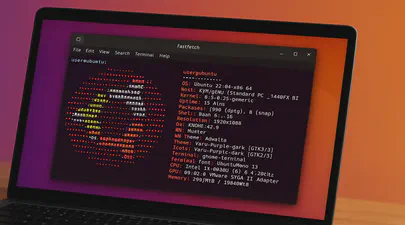
Fastfetch: The Speedy Successor Neofetch Replacement Your Ubuntu Terminal Needs
If you love customizing your Linux terminal and getting a quick, visually appealing overview of your system specs, you might have used neofetch in the past. However, neofetch is now deprecated and no longer actively maintained. A fantastic, actively maintained alternative is Fastfetch – known for its speed, extensive customization options, and feature set.
While you might be able to install Fastfetch on Ubuntu 22.04 (Jammy Jellyfish) using the standard sudo apt install fastfetch, the version available in the default Ubuntu repositories is often outdated. To get the latest features, bug fixes, and performance improvements, you’ll want to use a different method.
Building NDCTL Utilities from Source: A Comprehensive Guide
Building NDCTL with Meson on Ubuntu 24.04
The NDCTL
package includes the cxl, daxctl, and ndctl utilities. It uses the Meson build system for streamlined compilation. This guide reflects the modern build process for managing NVDIMMs, CXL, and PMEM on Ubuntu 24.04.
If you do not install a more recent Kernel than the one provided by the distro, then it is not recommended to compile these utilities from source code. If you have installed a mainline Kernel, then you will likely require a newer version of these utilities that are compatible with your Kernel. See the NDCTL Releases as the Kernel support information is provided there.
Read More
Understanding STREAM: Benchmarking Memory Bandwidth for DRAM and CXL
In today’s Artificial Intelligence (AI), Machine Learning (ML), and high-performance computing (HPC) landscape, memory bandwidth is a critical factor in determining overall system performance. As workloads grow increasingly data-intensive, traditional DRAM-only setups are often insufficient, prompting the rise of new memory expansion technologies like Compute Express Link (CXL). To evaluate memory bandwidth across DRAM and CXL devices, we use a modified industry-standard tool called STREAM.
In this blog, we’ll explore what STREAM is, how it works, why it’s commonly used for benchmarking memory bandwidth, and how a modified version of STREAM can be used to measure performance in heterogeneous memory environments, including DRAM and CXL.
Read More
A Step-by-Step Guide on Using Cloud Images with QEMU 9 on Ubuntu 24.04
Introduction
Cloud images are pre-configured, optimized templates of operating systems designed specifically for cloud and virtualized environments. Cloud images are essentially vanilla operating system installations, such as Ubuntu, with the addition of the cloud-init package. This package enables run-time configuration of the OS through user data, such as text files on an ISO filesystem or cloud provider metadata. Using cloud images significantly reduces the time and effort required to set up a new virtual machine. Unlike ISO images, which require a full installation process, cloud images boot up immediately with the OS pre-installed

Understanding Memory Usage with `smem`
Memory management is crucial for Linux administrators and developers, especially when optimizing performance for resource-intensive applications. While tools like top and htop are commonly used to monitor system performance, they often don’t provide enough detail regarding memory usage breakdown. This is where smem comes into play.
What is smem?
smem is a command-line tool that reports memory usage per process and provides better insight into shared memory than most traditional tools, taking shared memory pages into account. Unlike top or htop, which primarily display RSS (Resident Set Size), smem can also show USS (Unique Set Size), which is a better metric for understanding how much memory would be freed if a particular process were terminated. This blog will guide you through using smem, explaining these critical memory metrics and providing comparisons to more familiar tools.

A Practical Guide to Identify Compute Express Link (CXL) Devices in Your Server
In this article, we will provide four methods for identifying CXL devices in your server and how to determine which CPU socket and NUMA node each CXL device is connected. We will use CXL memory expansion (CXL.mem) devices for this article. The server was running Ubuntu 22.04.2 (Jammy Jellyfish) with Kernel 6.3 and ‘cxl-cli ’ version 75 built from source code. Many of the procedures will work on Kernel versions 5.16 or newer.
Read More
How To Map a CXL Endpoint to a CPU Socket in Linux
When working with CXL Type 3 Memory Expander endpoints, it’s nice to know which CPU Socket owns the root complex for the endpoint. This is very useful for memory tiering solutions where we want to keep the execution of application processes and threads ’local’ to the memory.
CXL memory expanders appear in Linux as memory-only or cpu-less NUMA Nodes. For example, NUMA nodes 2 & 3 do not have any CPUs assigned to them.
Read More
Using Linux Kernel Memory Tiering
In this post, I’ll discuss what memory tiering is, why we need it, and how to use the memory tiering feature available in the mainline v5.15 Kernel.
What is Memory Tiering?
With the advent of various new memory types, some systems will have multiple types of memory, e.g. High Bandwidth Memory (HBM), DRAM, Persistent Memory (PMem), CXL and others. The Memory Storage hierarchy should be familiar to you.

Memory Storage Hierarchy
Read More
How To map VMWare vSphere/ESXi PMem devices from the Host to Guest VM
In this post, we’ll use VMWare ESXi 7.0u3 to create a Guest VM running Ubuntu 21.10 with two Virtual Persistent Memory (vPMem) devices, then show how we can map the vPMem device in the host (ESXi) to “nmem” devices in the guest VM as shown by the ndctl utility.
If you’re new to using vPMem or need a refresher, start with the VMWare Persistent Memory documentation.
Table of Contents
- Create a Guest VM with vPMem Devices
- Install the Guest OS
- Install ndctl
- Mapping the NVDIMMs in the guest to devices in the ESXi Host
- Summary
Create a Guest VM with vPMem Devices
The procedure you use may be different from the one shown below if you use vSphere or an automated procedure.
Read More
How To Emulate CXL Devices using KVM and QEMU
What is CXL?
Compute Express Link (CXL) is an open standard for high-speed central processing unit-to-device and CPU-to-memory connections, designed for high-performance data center computers. CXL is built on the PCI Express physical and electrical interface with protocols in three areas: input/output, memory, and cache coherence.
CXL is designed to be an industry open standard interface for high-speed communications, as accelerators are increasingly used to complement CPUs in support of emerging applications such as Artificial Intelligence and Machine Learning.
Read More
How To Build a custom Linux Kernel to test Data Access Monitor (DAMON)
DAMON is a data access monitoring framework subsystem for the Linux kernel. DAMON (Data Access MONitor) tool monitors memory access patterns specific to user-space processes introduced in Linux kernel 5.15 LTS, such as operation schemes, physical memory monitoring, and proactive memory reclamation. It was designed and implemented by Amazon AWS Labs and upstreamed into the 5.15 Kernel , but it was not enabled by default.cd /boot
Keen to try this new feature to identify the working set size (Active Memory) of a server or process, this post documents the steps I took to build a custom Kernel with DAMON enabled using Fedora Server 35.
Read More
Resolving commands 'Killed' on GCP f1-micro Compute Engine instances
When I want to perform a quick task, I generally spin up a Google GCP Compute Engine instance as they’re cheap. However, they have limited resources, particularly memory. When refreshing the package repositories, it’s quite easy to encounter an Out-of-Memory (OOM) situation which results in the command - yum or dnf - is ‘killed’. For example:
$ sudo dnf update
CentOS Stream 8 - AppStream                                                                                                  8.3 MB/s |  18 MB     00:02
CentOS Stream 8 - BaseOS                                                                                                      13 MB/s |  16 MB     00:01
CentOS Stream 8 - Extras                                                                                                      69 kB/s |  16 kB     00:00
Google Compute Engine                                                                                                         20 kB/s | 9.4 kB     00:00
Google Cloud SDK                                                                                                              24 MB/s |  43 MB     00:01
Killed
dmesg has a lot of information about the situation, but the key line to confirm dnf caused the OOM event, is:

How To Enable Debug Logging in ipmctl
The ipmctl utility is used for configuring and managing Intel Optane Persistent Memory modules (DCPMM/PMem). It supports the functionality to:
- Discover Persistent Memory on the server
- Provision the persistent memory configuration
- View and update the firmware on the persistent memory modules
- Configure data-at-rest security
- Track health and performance of the persistent memory modules
- Debug and troubleshoot persistent memory modules
I wrote the IPMCTL User Guide showing how to use the tool, but what if ipmctl returns an error or something you’re not expecting? How do you debug the debugger? On Linux, ipmctl relies on libndctl to help perform communication to the BIOS and persistent memory modules themselves. This is a complicated stack involving multiple kernel drivers and the physical hardware itself. Anything along this path could be causing a problem.
Read More
How To Monitor Persistent Memory Performance on Linux using PCM, Prometheus, and Grafana
In a previous article, I showed How To Install Prometheus and Grafana on Fedora Server . This article demonstrates how to use the open-source Process Counter Monitor (PCM) utility to collect DRAM and Intel® Optane™ Persistent Memory statistics, and visualize the data in Grafana.
Processor Counter Monitor is an application programming interface (API) and a set of tools based on the API to monitor performance and energy metrics of Intel® Core™, Xeon®, Atom™ and Xeon Phi™ processors. It can also show memory bandwidth for DRAM and Intel Optane Persistent Memory devices. PCM works on Linux, Windows, Mac OS X, FreeBSD and DragonFlyBSD operating systems.
Read MoreUsing ltrace to see what ipmctl and ndctl are doing
Occasionally, it is necessary to debug commands that are slow. Or you may simply be interested in learning how the tools work. While there are many strategies, here are some simple methods that show code flow and timing information.
To show a high-level view of where the time is being spent within libipmctl, use:
# ltrace -c -o ltrace_library_count.out -l '*ipmctl*' ipmctl show -memoryresources
To show a high-level view of where the time is being spent within libndctl, use:
Read More
How to Boot Linux from Intel® Optane™ Persistent Memory
Introduction
In this article, I will demonstrate how to configure a system with Intel Optane Persistent Memory (PMem) and use part of the PMem as a boot device. This little known feature can reduce boot times for those that need it.
The basic steps include:
- Configure the Persistent Memory in AppDirect Interleaved
- Create two small SECTOR namespaces, one per Region
- Install the OS and select one or both of the namespaces (single disk install, or mirrored LVM)
Configure the Persistent Memory
The following figure shows how we will provision the persistent memory.
Read More
How to Boot Linux from Intel® Optane™ Persistent Memory
Introduction
In this article, I will demonstrate how to configure a system with Intel Optane Persistent Memory (PMem) and use part of the PMem as a boot device. This little known feature can reduce boot times for those that need it.
The basic steps include:
Configure the Persistent Memory in AppDirect Interleaved
Create two small SECTOR namespaces, one per Region
Install the OS and select one or both of the namespaces (single disk install, or mirrored LVM)
Read More

How to build an upstream Fedora Kernel from source
I typically keep my Fedora system current, updating it once every week or two. More recently, I wanted to test the Idle Page Tracking feature, but this wasn’t enabled in the default kernel provided by Fedora.
# grep CONFIG_IDLE_PAGE_TRACKING /boot/config-$(uname -r)
# CONFIG_IDLE_PAGE_TRACKING is not set
To enable the feature, we need to build a custom kernel with the feature(s) we need. Thankfully, the process isn’t too difficult.
For this walk through, I’ll be building a customised version of the Fedora 32 kernel version I already have installed (5.8.7-200.fc32.x86_64), using some of the instructions from https://fedoraproject.org/wiki/Building_a_custom_kernel .
Read More
Linux Device Mapper WriteCache (dm-writecache) performance improvements in Linux Kernel 5.8
The Linux ‘dm-writecache’ target allows for writeback caching of newly written data to an SSD or NVMe using persistent memory will achieve much better performance in Linux Kernel 5.8.
Red Hat developer Mikulas Patocka has been working to enhance the dm-writecache performance using Intel Optane Persistent Memory (PMem) as the cache device.
The performance optimization now queued for Linux 5.8 is making use of CLFLUSHOPT within dm-writecache when available instead of MOVNTI. CLFLUSHOPT is one of Intel’s persistent memory instructions that allows for optimized flushing of cache lines by supporting greater concurrency. The CLFLUSHOPT instruction has been supported on Intel servers since Skylake and on AMD since Zen.
Read More
"ipmctl show -memoryresources" returns "Error: GetMemoryResourcesInfo Failed"
Issue:
Running ipmctl show -memoryresources returns an error similar to the following:
# ipmctl show -memoryresources

Error: GetMemoryResourcesInfo Failed
Applies To:
Linux & Microsoft Windows
Intel Optane Persistent Memory
ipmctl utility
Cause:
The Platform Configuration Data (PCD) is invalid or has been erased using a previously executed ipmctl delete -dimm -pcd command or the system has new persistent memory modules that have not been initialized yet.
A module with an empty PCD will show information similar to the following. This shows an example of PCD of DIMM ID 0x0001. To review the PCD for all modules in the system use ipmctl show -dimm -pcd.
Intel Optane Persistent Memory Modules report "Non-functional" state in ipmctl
Issue
Executing ipmctl show-dimm to get device information shows the persistent memory modules in a ‘Non-functional’ health state, eg:
# ipmctl show -dimm

 DimmID | Capacity | HealthState    | ActionRequired | LockState | FWVersion
=============================================================================
 0x0001 | 0.0 GiB  | Non-functional | N/A            | N/A       | N/A
 0x0011 | 0.0 GiB  | Non-functional | N/A            | N/A       | N/A
 0x0021 | 0.0 GiB  | Non-functional | N/A            | N/A       | N/A
 0x0101 | 0.0 GiB  | Non-functional | N/A            | N/A       | N/A
 0x0111 | 0.0 GiB  | Non-functional | N/A            | N/A       | N/A
 0x0121 | 0.0 GiB  | Non-functional | N/A            | N/A       | N/A
 0x1001 | 0.0 GiB  | Non-functional | N/A            | N/A       | N/A
 0x1011 | 0.0 GiB  | Non-functional | N/A            | N/A       | N/A
 0x1021 | 0.0 GiB  | Non-functional | N/A            | N/A       | N/A
 0x1101 | 0.0 GiB  | Non-functional | N/A            | N/A       | N/A
 0x1111 | 0.0 GiB  | Non-functional | N/A            | N/A       | N/A
 0x1121 | 0.0 GiB  | Non-functional | N/A            | N/A       | N/A
Other ipmctl commands may fail and return “No functional DIMMs in the system.”, eg:

How To Set Linux CPU Scaling Governor to Max Performance
The majority of modern processors are capable of operating in a number of different clock frequency and voltage configurations, often referred to as Operating Performance Points or P-states (in ACPI terminology). As a rule, the higher the clock frequency and the higher the voltage, the more instructions can be retired by the CPU over a unit of time, but also the higher the clock frequency and the higher the voltage, the more energy is consumed over a unit of time (or the more power is drawn) by the CPU in the given P-state. Therefore there is a natural trade-off between the CPU capacity (the number of instructions that can be executed over a unit of time) and the power drawn by the CPU.
Read More
How To Verify Linux Kernel Support for Persistent Memory
Linux Kernel support for persistent memory was first delivered in version 4.0 of the mainline kernel, however, it was not enabled by default until version 4.2.
If you use a Linux distribution that uses kernel 4.2 or later, or the distro backports features in to an older kernel, you will almost certainly have persistent memory support enabled by default. It is still worth verifying what features are enabled and disabled as this may vary by distro and release version for the very latest persistent memory features.
Read More
How To Extend Volatile System Memory (RAM) using Persistent Memory on Linux
Intel(R) Optane(TM) Persistent Memory delivers a unique combination of affordable large capacity and support for data persistence. Electrically compatible with DDR4, large capacity modules up to 512GB each can be installed in compatible servers alongside DDR on the memory bus.
Intel’s persistent memory product can be provisioned in a volatile “Memory Mode” which replaces DRAM volatile capacity with the persistent memory capacity, and persistent “AppDirect” mode which presents both DRAM and persistent memory to the operating system and applications. Both modes are explained in more detail here . It is possible to configure a system to utilize a percentage of persistent memory as volatile and persistent, but this mixed-mode still provisions all the DRAM capacity as a Last-Level Cache.
Read More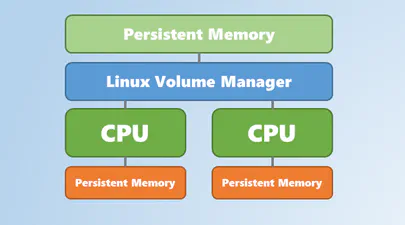
Using Linux Volume Manager (LVM) with Persistent Memory
In this article, we show how to use the Linux Volume Manager (LVM) to create concatenated, striped, and mirrored logical volumes using persistent memory modules as the backing storage device. Specifically, we will be using the Intel® Optane™ Persistent Memory Modules on a two socket system with Intel® Cascade Lake Xeon® CPUs, also referred to as 2nd Generation Intel® Xeon® Scalable Processors.