NDCTL
Building NDCTL Utilities from Source: A Comprehensive Guide
Building NDCTL with Meson on Ubuntu 24.04
The NDCTL
package includes the cxl, daxctl, and ndctl utilities. It uses the Meson build system for streamlined compilation. This guide reflects the modern build process for managing NVDIMMs, CXL, and PMEM on Ubuntu 24.04.
If you do not install a more recent Kernel than the one provided by the distro, then it is not recommended to compile these utilities from source code. If you have installed a mainline Kernel, then you will likely require a newer version of these utilities that are compatible with your Kernel. See the NDCTL Releases as the Kernel support information is provided there.
Read More
How To Emulate CXL Devices using KVM and QEMU
What is CXL?
Compute Express Link (CXL) is an open standard for high-speed central processing unit-to-device and CPU-to-memory connections, designed for high-performance data center computers. CXL is built on the PCI Express physical and electrical interface with protocols in three areas: input/output, memory, and cache coherence.
CXL is designed to be an industry open standard interface for high-speed communications, as accelerators are increasingly used to complement CPUs in support of emerging applications such as Artificial Intelligence and Machine Learning.
Read MoreUsing ltrace to see what ipmctl and ndctl are doing
Occasionally, it is necessary to debug commands that are slow. Or you may simply be interested in learning how the tools work. While there are many strategies, here are some simple methods that show code flow and timing information.
To show a high-level view of where the time is being spent within libipmctl, use:
# ltrace -c -o ltrace_library_count.out -l '*ipmctl*' ipmctl show -memoryresources
To show a high-level view of where the time is being spent within libndctl, use:
Read More
How to Boot Linux from Intel® Optane™ Persistent Memory
Introduction
In this article, I will demonstrate how to configure a system with Intel Optane Persistent Memory (PMem) and use part of the PMem as a boot device. This little known feature can reduce boot times for those that need it.
The basic steps include:
- Configure the Persistent Memory in AppDirect Interleaved
- Create two small SECTOR namespaces, one per Region
- Install the OS and select one or both of the namespaces (single disk install, or mirrored LVM)
Configure the Persistent Memory
The following figure shows how we will provision the persistent memory.
Read More
How to Boot Linux from Intel® Optane™ Persistent Memory
Introduction
In this article, I will demonstrate how to configure a system with Intel Optane Persistent Memory (PMem) and use part of the PMem as a boot device. This little known feature can reduce boot times for those that need it.
The basic steps include:
Configure the Persistent Memory in AppDirect Interleaved
Create two small SECTOR namespaces, one per Region
Install the OS and select one or both of the namespaces (single disk install, or mirrored LVM)
Read More
How To Extend Volatile System Memory (RAM) using Persistent Memory on Linux
Intel(R) Optane(TM) Persistent Memory delivers a unique combination of affordable large capacity and support for data persistence. Electrically compatible with DDR4, large capacity modules up to 512GB each can be installed in compatible servers alongside DDR on the memory bus.
Intel’s persistent memory product can be provisioned in a volatile “Memory Mode” which replaces DRAM volatile capacity with the persistent memory capacity, and persistent “AppDirect” mode which presents both DRAM and persistent memory to the operating system and applications. Both modes are explained in more detail here . It is possible to configure a system to utilize a percentage of persistent memory as volatile and persistent, but this mixed-mode still provisions all the DRAM capacity as a Last-Level Cache.
Read More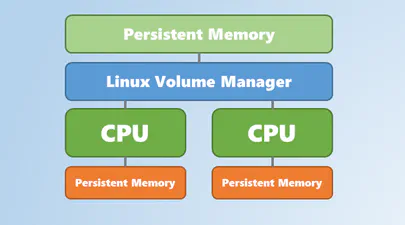
Using Linux Volume Manager (LVM) with Persistent Memory
In this article, we show how to use the Linux Volume Manager (LVM) to create concatenated, striped, and mirrored logical volumes using persistent memory modules as the backing storage device. Specifically, we will be using the Intel® Optane™ Persistent Memory Modules on a two socket system with Intel® Cascade Lake Xeon® CPUs, also referred to as 2nd Generation Intel® Xeon® Scalable Processors.