Ubuntu

Your Personal Codespace: Self-Host VS Code on Any Server
GitHub Codespaces and other cloud IDEs have revolutionized development, offering a complete VS Code environment that runs on a remote server and is accessible from any browser. It’s a game-changer for productivity and flexibility.
But what if you could have that same powerful, seamless experience on your own terms?
This guide will show you how to build your very own private Codespace, replicating the convenience of the GitHub experience on any server you control—be it a machine in your home lab, a dedicated server, or a budget-friendly cloud VM. We’ll explore two distinct paths to get you up and running with a persistent, browser-based VS Code instance on Ubuntu 24.04, complete with AI assistants like Gemini and GitHub Copilot to boost your workflow.
Read More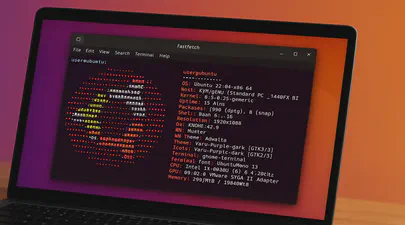
Fastfetch: The Speedy Successor Neofetch Replacement Your Ubuntu Terminal Needs
If you love customizing your Linux terminal and getting a quick, visually appealing overview of your system specs, you might have used neofetch in the past. However, neofetch is now deprecated and no longer actively maintained. A fantastic, actively maintained alternative is Fastfetch – known for its speed, extensive customization options, and feature set.
While you might be able to install Fastfetch on Ubuntu 22.04 (Jammy Jellyfish) using the standard sudo apt install fastfetch, the version available in the default Ubuntu repositories is often outdated. To get the latest features, bug fixes, and performance improvements, you’ll want to use a different method.
A Step-by-Step Guide on Using Cloud Images with QEMU 9 on Ubuntu 24.04
Introduction
Cloud images are pre-configured, optimized templates of operating systems designed specifically for cloud and virtualized environments. Cloud images are essentially vanilla operating system installations, such as Ubuntu, with the addition of the cloud-init package. This package enables run-time configuration of the OS through user data, such as text files on an ISO filesystem or cloud provider metadata. Using cloud images significantly reduces the time and effort required to set up a new virtual machine. Unlike ISO images, which require a full installation process, cloud images boot up immediately with the OS pre-installed

Running Open WebUI and Ollama on Ubuntu 22.04 for a Local ChatGPT Experience
Introduction
Open WebUI and Ollama are powerful tools that allow you to create a local chat experience using GPT models. Whether you’re experimenting with natural language understanding or building your own conversational AI, these tools provide a user-friendly interface for interacting with language models. In this guide, we’ll walk you through the installation process step by step.
Ollama is a cutting-edge platform designed to run open-source large language models locally on your machine. It simplifies the complexities involved in deploying and managing these models, making it an attractive choice for researchers, developers, and anyone who wants to experiment with language models1. Ollama provides a user-friendly interface for running large language models (LLMs) locally, specifically on MacOS and Linux (with Windows support on the horizon).
Read MoreHow To Install a Mainline Linux Kernel in Ubuntu
Note: This article was updated on Thursday, July 31st, 2025 and will work with newer Ubuntu releases.
By default, Ubuntu systems run with the Ubuntu kernels provided by the Ubuntu repositories. To get unmodified upstream kernels that have new features or to confirm that upstream has fixed a specific issue, we often need to install the mainline Kernel. The mainline kernel is the most recent version of the Linux kernel released by the Linux Kernel Organization. It undergoes several stages of development, including merge windows, release candidates, and final releases. Mainline kernels are designed to offer the latest features and improvements, making them attractive to developers and power users. Kernel.org lists the available Kernel versions.
Read More